
Read makes it easy to delete your account at any time. If you delete your account, you will immediately lose access to all of the content in your account. Unless you belong to a Workspace, all of the meeting reports owned by your account will also be immediately deleted. We recommend that you save any data you might want to access later on before deleting your account, as deletion cannot be undone.
1. Sign in to your SIORA Account.
• If you used SSO to create the account (like Google or Apple), please use the same SSO method to sign in.
2. Open the Side Menu
• Tap the menu icon (☰) located at the top left of the screen.
• From the list, select Profile & History.
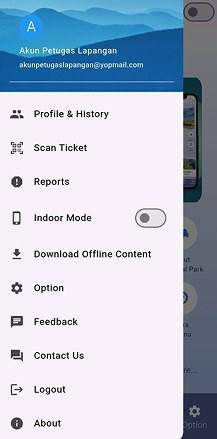
3. Go to Profile Page
• On the Profile page, tap Remove Accounts.
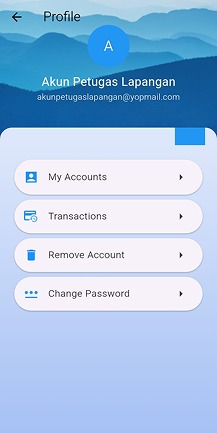
4. Select “Remove Account”
• From the options displayed (My Accounts, Transactions, Remove Account, Change Password), tap Remove Account.
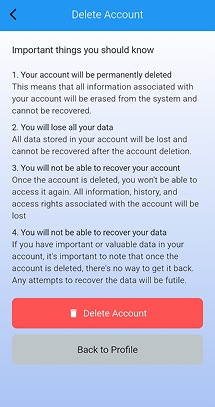
5. Read the Deletion Notice
• The app will display an information screen titled Delete Account.
• Carefully read the important notes explaining that:
6. Confirm Account Deletion
• Tap the Delete Account button (red).
• A confirmation message will appear. Choose Yes to confirm.
7. Completion
• Your account and all related data will be deleted from the system.
• You will be redirected back to the login screen.